I've always been fond of the idea of the Raspberry Pi. An energy efficient, small, cheap but capable computer. An ideal home server. Until the Pi 4, the Pi was not that capable, and only with the relatively recent Pi 5 (fall 2023) do I feel the Pi is OK performance wise, although still hampered by SD card performance1. And the Pi isn't that cheap either.
The Pi 5 can be fitted with an NVME SSD, but for me it's too little, too late. Because I feel there is a type of computer on the market, that is much more compelling than the Pi.
I'm talking about the tinyminimicro home lab 'revolution' started by servethehome.com about four years ago (2020).
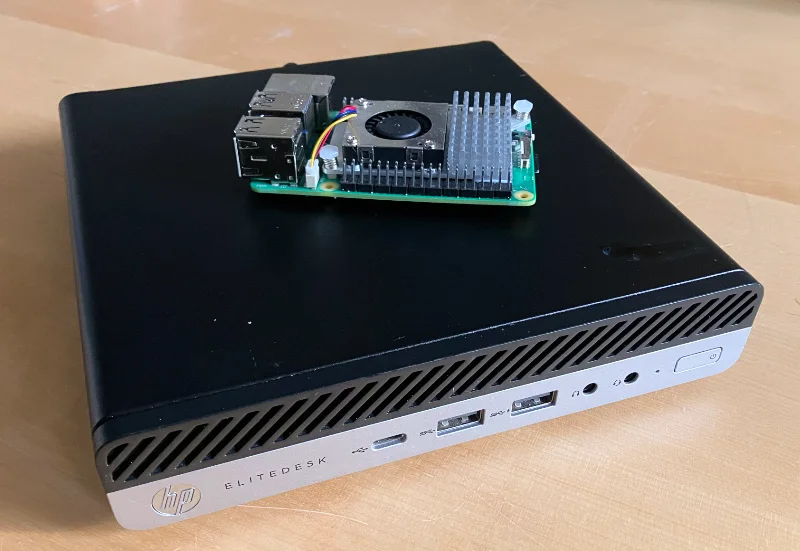
A 1L mini PC (Elitedesk 705 G4) with a Raspberry Pi 5 on top
During the pandemic, the Raspberry Pi was in short supply and people started looking for alternatives. The people at servethehome realised that these small enterprise desktop PCs could be a good option. Dell (micro), Lenovo (tiny) and HP (mini) all make these small desktop PCs, which are also known as 1L (one liter) PCs.
These Mini PC are not cheap2 when bought new, but older models are sold at a very steep discount as enterprises offload old models by the thousands on the second hand market (through intermediates).
Although these computers are often several years old, they are still much faster than a Raspberry Pi (including the Pi 5) and can hold more RAM.
I decided to buy two HP Elitedesk Mini PCs to try them out, one based on AMD and the other based on Intel.
The Hardware
| Elitedesk Mini G3 800 | Elitedesk Mini G4 705 | |
|---|---|---|
| CPU | Intel i5-6500 (65W) | AMD Ryzen 3 PRO 2200GE (35W) |
| RAM | 16 GB (max 32 GB) | 16 GB (max 32 GB) |
| HDD | 250 GB (SSD) | 250 GB (NVME) |
| Network | 1Gb (Intel) | 1Gb (Realtek) |
| WiFi | Not installed | Not installed |
| Display | 2 x DP, 1 x VGA | 3 x DP |
| Remote management | Yes | No |
| Idle power | 4 W | 10 W |
| Price | €160 | €115 |
The AMD-based system is cheaper, but you 'pay' in higher idle power usage. In absolute terms 10 watt is still decent, but the Intel model directly competes with the Pi 5 on idle power consumption.

Elitedesk 705 left, Elitedesk 800 right (click to enlarge)
Regarding display output, these devices have two fixed displayport outputs, but there is one port that is configurable. It can be displayport, VGA or HDMI. Depending on the supplier you may be able to configure this option, or you can buy them separately for €15-€25 online.

 Click on image for official specs in PDF format
Both models seem to be equipped with socketed CPUs. Although options for this formfactor are limited, it's possible to upgrade.
Comparing cost with the Pi 5
The Raspberry Pi 5 with (max) 8 GB of RAM costs ~91 Euro, almost exactly the same price as the AMD-based mini PC3 in its base configuration (8GB RAM). Yet, with the Pi, you still need:
- power supply (€13)
- case (€11)
- SD card or NVME SSD (€10-€45)
- NVME hat (€15) (optional but would be more comparable)
It's true that I'm comparing a new computer to a second hand device, and you can decide if that matters in this case. With a complete Pi 5 at around €160 including taxes and shipping, the AMD-based 1L PC is clearly the cheaper and still more capable option.
Comparing performance with the Pi 5
The first two rows in this table show the Geekbench 6 score of the Intel and AMD mini PCs I've bought for evaluation. I've added the benchmark results of some other computers I've access to, just to provide some context.
| CPU | Single-core | Multi-core |
|---|---|---|
| AMD Ryzen 3 PRO 2200GE (32W) | 1148 | 3343 |
| Intel i5-6500 (65W) | 1307 | 3702 |
| Mac Mini M2 | 2677 | 9984 |
| Mac Mini i3-8100B | 1250 | 3824 |
| HP Microserver Gen8 Xeon E3-1200v2 | 744 | 2595 |
| Raspberry Pi 5 | 806 | 1861 |
| Intel i9-13900k | 2938 | 21413 |
| Intel E5-2680 v2 | 558 | 5859 |
Sure, these mini PCs won't come close to modern hardware like the Apple M2 or the intel i9. But if we look at the performance of the mini PCs we can observe that:
- The Intel i5-6500T CPU is 13% faster in single-core than the AMD Ryzen 3 PRO
- Both the Intel and AMD processors are 42% - 62% faster than the Pi 5 regarding single-core performance.
Storage (performance)
If there's one thing that really holds the Pi back, it's the SD card storage. If you buy a decent SD card (A1/A2) that doesn't have terrible random IOPs performance, you realise that you can get a SATA or NVME SSD for almost the same price that has more capacity and much better (random) IO performance.
With the Pi 5, NVME SSD storage isn't standard and requires an extra hat. I feel that the missing integrated NVME storage option for the Pi 5 is a missed opportunity that - in my view - hurts the Pi 5.
Now in contrast, the Intel-based mini PC came with a SATA SSD in a special mounting bracket. That bracket also contained a small fan(1) to keep the underlying NVME storage (not present) cooled.

There is a fan under the SATA SSD (click to enlarge)
The AMD-based mini PC was equipped with an NVME SSD and was not equipped with the SSD mounting bracket. The low price must come from somewhere...
However, both systems have support for SATA SSD storage, an 80mm NVME SSD and a small 2230 slot for a WiFi card. There seems no room on the 705 G4 to put in a small SSD, but there are adapters available that convert the WiFi slot to a slot usable for an extra NVME SSD, which might be an option for the 800 G3.
Noice levels (subjective)
Both systems are barely audible at idle, but you will notice them (if you sensitive to that sort of thing). The AMD system seems to become quite loud under full load. The Intel system also became loud under full load, but much more like a Mac Mini: the noise is less loud and more tolerable in my view.
Idle power consumption
Elitedesk 800 (Intel)
I can get the Intel-based Elitedesk 800 G3 to 3.5 watt at idle. Let that sink in for a moment. That's about the same power draw as the Raspberry Pi 5 at idle!
Just installing Debian 12 instead of Windows 10 makes the idle power consumption drop from 10-11 watt to around 7 watt.
Then on Debian, you:
- run
apt install powertop - run
powertop --auto-tune(saves ~2 Watt) - Unplug the monitor (run headless) (saves ~1 Watt)
You have to put the powertop --auto-tune command in /etc/rc.local:
#!/usr/bin/env bash
powertop --auto-tune
exit 0
Then apply chmod +x /etc/rc.local
So, for about the same idle power draw you get so much more performance, and go beyond the max 8GB RAM of the Pi 5.
Elitedesk 705 (AMD)
I managed to get this system to 10-11 watt at idle, but it was a pain to get there.
I measured around 11 Watts idle power consumption running a preinstalled Windows 11 (with monitor connected). After installing Debian 12 the system used 18 Watts at idle and so began a journey of many hours trying to solve this problem.
The culprit is the integrated Radeon Vega GPU. To solve the problem you have to:
- Configure the 'bios' to only use UEFI
- Reinstall Debian 12 using UEFI
- install the appropriate firmware with
apt install firmware-amd-graphics
If you boot the computer using legacy 'bios' mode, the AMD Radeon firmware won't load no matter what you try. You can see this by issuing the commands:
rmmod amdgpu
modprobe amdgpu
You may notice errors on the physical console or in the logs that the GPU driver isn't loaded because it's missing firmware (a lie).
This whole process got me to around 12 Watt at idle. To get to ~10 Watts idle you need to do also run powertop --auto-tune and disconnect the monitor, as stated in the 'Intel' section earlier.
Given the whole picture, 10-11 Watt at idle is perfectly okay for a home server, and if you just want the cheapest option possible, this is still a fine system.
KVM Virtualisation
I'm running vanilla KVM (Debian 12) on these Mini PCs and it works totally fine. I've created multiple virtual machines without issue and performance seemed perfectly adequate.
Boot performance
From the moment I pressed the power button to SSH connecting, it took 17 seconds for the Elitedesk 800.
The Elitedesk 705 took 33 seconds until I got an SSH shell.
These boot times include the 5 second boot delay within the GRUB bootloader screen that is default for Debian 12.
Remote management support
Some of you may be familiar with IPMI (ILO, DRAC, and so on) which is standard on most servers. But there is also similar technology for (enterprise) desktops.
Intel AMT/ME is a technology used for remote out-of-band management of computers. It can be an interesting feature in a homelab environment but I have no need for it. If you want to try it, you can follow this guide.
For most people, it may be best to disable the AMT/ME feature as it has a history of security vulnerabilities. This may not be a huge issue within a trusted home network, but you have been warned.
The AMD-based Elitedesk 705 didn't came with equivalent remote management capabilities as far as I can tell.
Alternatives
The models discussed here are older models that are selected for a particular price point. Newer models from Lenovo, HP and Dell, equip more modern processors which are faster and have more cores. They are often also priced significantly higher.
If you are looking for low-power small formfactor PCs with more potent or customisable hardware, you may want to look at second-hand NUC formfactor PCs.
Stacking multiple mini PCs
The AMD-based Elitedesk 705 G4 is closed at the top and it's possible to stack other mini PCs on top.
The Intel-based Elitedesk 800 G3 has a perforated top enclosure, and putting another mini pc on top might suffocate the CPU fan.
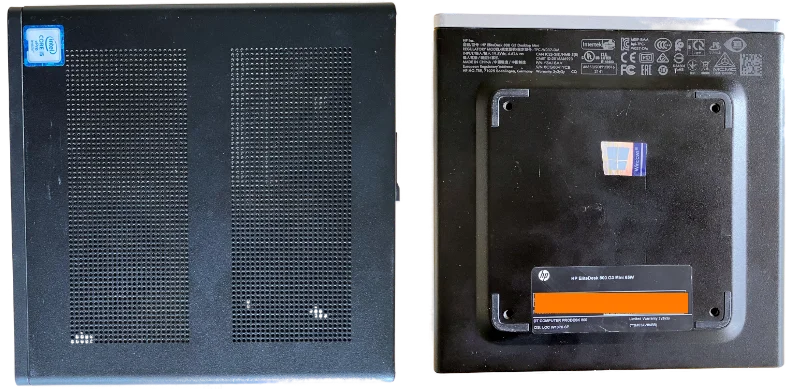
As you can see, the bottom/foot of the mini PC doubles as a VESA mount and has four screw holes. By putting some screws in those holes, you may effectively create standoffs that gives the machine below enough space to breathe (maybe you can use actual standoffs).
Evaluation and conclusion
I think these second-hand 1L tinyminimicro PCs are better suited to play the role of home (lab) server than the Raspberry Pi (5).
The increased CPU performance, the built-in SSD/NVME support, the option to go beyond 8 GB of RAM (up to 32GB) and the price point on the second-hand market really makes a difference.
I love the Raspberry Pi and I still have a ton of Pi 4s. This solar-powered blog is hosted on a Pi 4 because of the low power consumption and the availability of GPIO pins for the solar status display.
That said, unless the Raspberry Pi becomes a lot cheaper (and more potent), I'm not so sure it's such a compelling home server.
This blog post featured on the front page of Hacker News.
-
even a decent quality SD card is no match (in terms of random IOPs and sequential throughput) for a regular SATA or NVME SSD. The fact that the Pi 5 has no on-board NVME support is a huge shortcomming in my view. ↩
-
in the sense that you can buy a ton of fully decked out Pi 5s for the price of one such system. ↩
-
The base price included the external power brick and 256GB NVME storage. ↩