1. Bose SoundLink On-Ear Headphones Battery Replacement

    Tue 25 February 2025

    Skip to the bottom two paragraph for instructions on how to replace the battery.


    I bought my Bose SoundLink on-ear Bluetooth headphones for 250 Euros around 2017 and I really like them. They are small, light, comfortable and can easily fit in a coat pocket when folded.

    Up until now (about 7 years later) I have replaced the ear cushions in 2019 (€25) and 2024 (€18).

    headphones

    Early 2025, battery capacity had deteriorated to a point where it became noticeable. The battery was clearly dying.

    Unfortunately these headphones aren't designed for easy battery replacement:

    • Bose hasn't published instructions on how to replace the battery, doesn't offer a replacement battery and hasn't documented which battery type/model is used.
    • The left 'head phone' has two Torx security screws and most people won't have the appropriate screwdriver for this size
    • There is soldering involved

    I wanted to try a battery replacement anyway as I hate to throw away a perfectly good, working product just because the battery has worn out. Maybe at some point the headband needs replacing, but with a fresh battery, these headphones can last another 7 years. Let's prevent a bit of e-waste with a little bit of cost and effort.

    Most of all, the cost of this battery replacement is much lower than a new pair of headphones as the battery was €18 including taxes and shipping.

    Right to repair should include easy battery replacement

    Although my repair seemed to have worked out fine, it requires enough effort that most people won't even try. For this reason, I feel that it should be mandatory by law that:

    1. Batteries in any product must be user-replaceable (no special equipment or soldering required)
    2. Batteries must be provided by the vendor until 10 years after the last day the product was sold (unless it's a standard format like AA(A) or 18650).
    3. Batteries must be provided at max 10% of the cost of the original product
    4. The penalty for non-compliance should be high enough such that it won't be regarded as the cost of doing business

    For that matter, all components that may wear down over time should be user-replaceable.


    What you need to replace the battery

    1. Buy the exact battery type: ahb571935pct-01 (350mAh) (notice the three wires!)
    2. A Philips #0 screwdriver / bit
    3. A Torx T6H security screwdriver / bit (iFixit kits have them)
    4. A soldering iron
    5. Solder
    6. Heat shrink for 'very thin wire'
    7. Multimeter (optional)
    8. a bit of tape to 'cap off' bare battery leads

    Please note that I found another battery ahb571935pct-03 with similar specifications (capacity and voltage) but I don't know if it will fit.

    Putting the headphone ear cushion back on can actually be the hardest part of the process, you need to be firm and this process is documented by Bose.

    Battery replacement steps I took

    Make sure you don't short the wires on the old or new battery during replacement

    The battery is located in the left 'head phone'.

    headphone closeup

    1. Use a multimeter to check if your new battery isn't dead (should be 3+ volt)
    2. Remove the ear cushion from the left 'head phone' very gently as not to tear the rim
    3. Remove the two philips screws that keep the driver (speaker) in place
    4. Remove the two Torx screws (you may have to press a bit harder)
    5. Remove the speaker and be carefull not to snap the wire
    6. Gently remove the battery from the 'head phone'
    7. Cut the wires close to the old battery (one by one!) and cover the wires on the battery to prevent a short
    8. Strip the three wires from the headphones a tiny bit (just a few mm)
    9. Put a short piece of heat shrink on each of the three wires of the battery
    10. Solder each wire to the correct wire in the ear cup
    11. Adjust the location of the heat shrink over the freshly soldered joint.
    12. Use the soldering iron close to the heat shrink to shrink it (don't touch anything), this can take some time, be patient
    13. Check that the heat shrink is fixed in place and can't move
    14. Put the battery into it's specific location in the back of the 'head phone'
    15. Test the headphones briefly before reassembling the headphones
    16. Reassemble the 'head phone' (consider leaving out the two Torx screws)
    17. Dispose of the old battery in a responsible manner
    Tagged as : Hardware
    If you have any comments email me, see the About page for contact details.
  2. My 71 TiB ZFS NAS After 10 Years and Zero Drive Failures

    Sat 14 September 2024

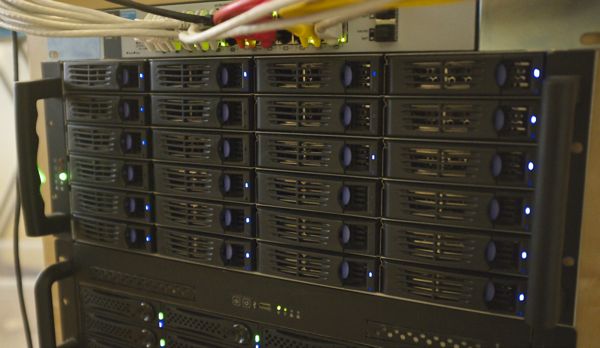
    My 4U 71 TiB ZFS NAS built with twenty-four 4 TB drives is over 10 years old and still going strong.

    my nas

    Although now on its second motherboard and power supply, the system has yet to experience a single drive failure (knock on wood).

    Zero drive failures in ten years, how is that possible?

    Let's talk about the drives first

    The 4 TB HGST drives have roughly 6000 hours on them after ten years. You might think something's off and you'd be right. That's only about 250 days worth of runtime. And therein lies the secret of drive longevity (I think):

    Turn the server off when you're not using it.


    According to people on Hacker News I have my bearings wrong. The chance of having zero drive failures over 10 years for 24 drives is much higher than I thought it was. So this good result may not be related to turning my NAS off and keeping it off most off the time.


    My NAS is turned off by default. I only turn it on (remotely) when I need to use it. I use a script to turn the IoT power bar on and once the BMC (Baseboard Management Controller) is done booting, I use IPMI to turn on the NAS itself. But I could have used Wake-on-Lan too as an alternative.

    Once I'm done using the server, I run a small script that turns the server off, wait a few seconds and then turn the wall socket off.

    It wasn't enough for me to just turn off the server, but leave the motherboard, and thus the BMC powered, because that's just a constant 7 watts (about two Raspberry Pis at idle) being wasted (24/7).

    This process works for me because I run other services on low-power devices such as Raspberry Pi4s or servers that use much less power when idling than my 'big' NAS.

    This proces reduces my energy bill considerably (primary motivation) and also seems great for hard drive longevity.

    Although zero drive failures to date is awesome, N=24 is not very representative and I could just be very lucky. Yet, it was the same story with the predecessor of this NAS, a machine with 20 drives (1 TB Samsung Spinpoint F1s (remember those?)) and I also had zero drive failures during its operational lifespan (~5 years).

    The motherboard (died once)

    Although the drives are still ok, I had to replace the motherboard a few years ago. The failure mode of the motherboard was interesting: it was impossible to get into the BIOS and it would occasionally fail to boot. I tried the obvious like removing the CMOS battery and such but to no avail.

    Fortunately, the [motherboard]1 was still available on Ebay for a decent price so that ended up not being a big deal.

    ZFS

    ZFS worked fine for all these years. I've switched operating systems over the years and I never had an issue importing the pool back into the new OS install. If I would build a new storage server, I would definitely use ZFS again.

    I run a zpool scrub on the drives a few times a year2. The scrub has never found a single checksum error. I must have run so many scrubs, more than a petabyte of data must have been read from the drives (all drives combined) and ZFS didn't have to kick in.

    I'm not surprised by this result at all. Drives tend to fail most often in two modes:

    1. Total failure, drive isn't even detected
    2. Bad sectors (read or write failures)

    There is a third failure mode, but it's extremely rare: silent data corruption. Silent data corruption is 'silent' because a disk isn't aware it delivered corrupted data. Or the SATA connection didn't detect any checksum errors.

    However, due to all the low-level checksumming, this risk is extremely small. It's a real risk, don't get me wrong, but it's a small risk. To me, it's a risk you mostly care about at scale, in datacenters3 but for residential usage, it's totally reasonable to accept the risk4.

    But ZFS is not that difficult to learn and if you are well-versed in Linux or FreeBSD, it's absolutely worth checking out. Just remember!

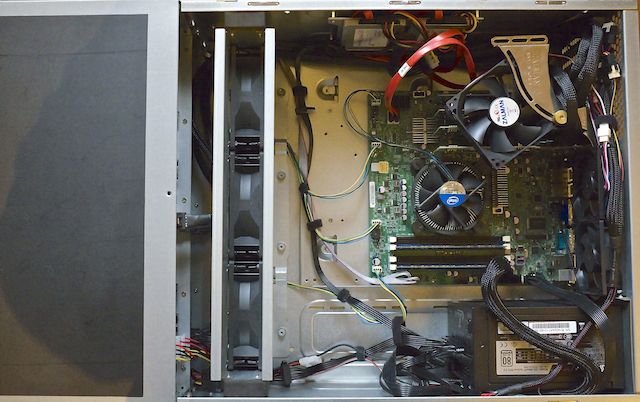
    inside

    Sound levels (It's Oh So Quiet)

    This NAS is very quiet for a NAS (video with audio).

    But to get there, I had to do some work.

    The chassis contains three sturdy 12V fans that cool the 24 drive cages. These fans are extremely loud if they run at their default speed. But because they are so beefy, they are fairly quiet when they run at idle RPM5, yet they still provide enough airflow, most of the time. But running at idle speeds was not enough as the drives would heat up eventually, especially when they are being read from / written to.

    Fortunately, the particular Supermicro motherboard I bought at the time allows all fan headers to be controlled through Linux. So I decided to create a script that sets the fan speed according to the temperature of the hottest drive in the chassis.

    I actually visited a math-related subreddit and asked for an algorithm that would best fit my need to create a silent setup and also keep the drives cool. Somebody recommended to use a "PID controller", which I knew nothing about. So I wrote some Python, stole some example Python PID controller code, and tweaked the parameters to find a balance between sound and cooling performance.

    The script has worked very well over the years and kept the drives at 40C or below. PID controllers are awesome and I feel it should be used in much more equipment that controls fans, temperature, and so on, instead of 'dumb' on/of behaviour or less 'dumb' lookup tables.

    Networking

    I started out with quad-port gigabit network controllers and I used network bonding to get around 450 MB/s network transfer speeds between various systems. This setup required a ton of UTP cables so eventually I got bored with that and I bought some cheap Infiniband cards and that worked fine, I could reach around 700 MB/s between systems. As I decided to move away from Ubuntu and back to Debian, I faced a problem: the Infiniband cards didn't work anymore and I could not figure out how to fix it. So I decided to buy some second-hand 10Gbit Ethernet cards and those work totally fine to this day.

    The dead power supply

    When you turn this system on, all drives spin up at once (no staggered spinup) and that draws around 600W for a few seconds. I remember that the power supply was rated for 750W and the 12 volt rail would have been able to deliver enough power, but it would sometimes cut out at boot nonetheless.

    UPS (or lack thereof)

    For many years, I used a beefy UPS with the system, to protect against power failure, just to be able to shutdown cleanly during an outage. This worked fine, but I noticed that the UPS used another 10+ watts on top of the usage of the server and I decided it had to go.

    Losing the system due to power shenanigans is a risk I accept.

    Backups (or a lack thereof)

    My most important data is backed up trice. But a lot of data stored on this server isn't important enough for me to backup. I rely on replacement hardware and ZFS protecting against data loss due to drive failure.

    And if that's not enough, I'm out of luck. I've accepted that risk for 10 years. Maybe one day my luck will run out, but until then, I enjoy what I have.

    Future storage plans (or lack thereof)

    To be frank, I don't have any. I built this server back in the day because I didn't want to shuffle data around due to storage space constraints and I still have ample space left.

    I have a spare motherboard, CPU, Memory and a spare HBA card so I'm quite likely able to revive the system if something breaks.

    As hard drive sizes have increased tremendously, I may eventually move away from the 24-drive bay chassis into a smaller form-factor. It's possible to create the same amount of redundant storage space with only 6-8 hard drives with RAIDZ2 (RAID 6) redundancy. Yet, storage is always expensive.

    But another likely scenario is that in the coming years this system eventually dies and I decide not to replace it at all, and my storage hobby will come to an end.


    This article was a Hacker News Hit


    1. I needed the same board, because the server uses four PCIe slots: 3 x HBA and 1 x 10Gbit NIC. 

    2. It takes ~20 hours to complete a scrub and it uses a ton of power while doing so. As I'm on a dynamic power tariff, I run it on 'cheap' days. 

    3. enterprise hard drives used in servers and SANs had larger sector sizes to accommodate even more checksumming data to prevent against silent data corruption. 

    4. every time I listen to ZFS enthusiasts you get the impression you are taking insane risks with your data if you don't run ZFS. I disagree, it all depends on context and circumstances. 

    5. Because there is little airflow by default, I had to add a fan to cool the four PCIe cards (HBA and networking) or they would have gotten way too hot. 

    Tagged as : Hardware
    If you have any comments email me, see the About page for contact details.

Page 1 / 3