1. I Made My Blog Solar-Powered, Then Things Escalated

    Mon 17 April 2023

    In 2020 I wondered if I could run my blog on solar power, being inspired by Low-tech Magazine, doing the same thing (but better)1. The answer was 'yes', but only through spring and summer.

    I live in an apartment complex in The Netherlands and my balcony is facing west. This means it only receives direct sunlight from 16:00 onward during spring and summer. Most of the time, the panels only get indirect sunlight and therefore generate just a tiny fraction of their rated performance. The key issue is not solar, but the west-facing balcony (it should ideally be facing south).
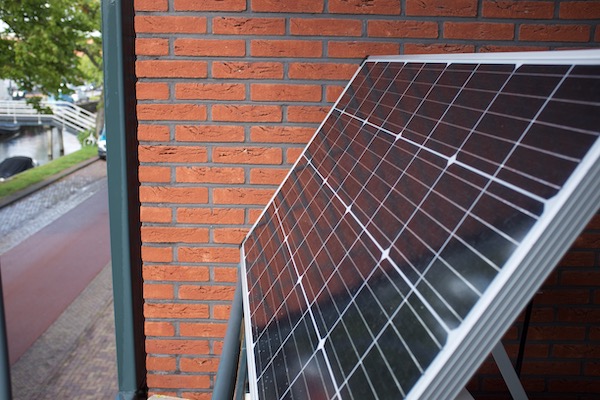
    solar panel original solar panel

    It's fair to say that my experiment isn't rational because of the sub-optimal solar conditions. Yet, I'm unreasonably obsessed by solar power and I wanted to make it work, even if it didn't make sense from an economic or environmental perspective2.

    When I wrote my blog about my solar-powered setup, I was already on my second iteration: I started out with just a 60 Watt panel and a cheap $20 solar controller3. That didn't even come close to being sufficient, so I upgraded the solar controller and bought a second panel rated for 150 Watt, which is pictured above. With the 60 Watt and 150 Watt panels in parallel, it was still not enough to keep the batteries charged in the fall and winter, due to the west-facing balcony.

    A Raspberry Pi 4B+ consumes around ~3.5 Watt of power continuously. Although that sounds like a very light load, if you run it for 24 hours, it's equivalent to using 84 Watts continuously for one hour. That's like running two 40 Watt fans for one hour, it's not insignificant and it doesn't even account for battery charging losses.

    So 210 Watt of solar (receiving mostly indirect sunlight) still could not power my Raspberry Pi through the winter under my circumstances. Yet, in the summer, I had plenty of power available and had no problems charging my iPad and other devices.

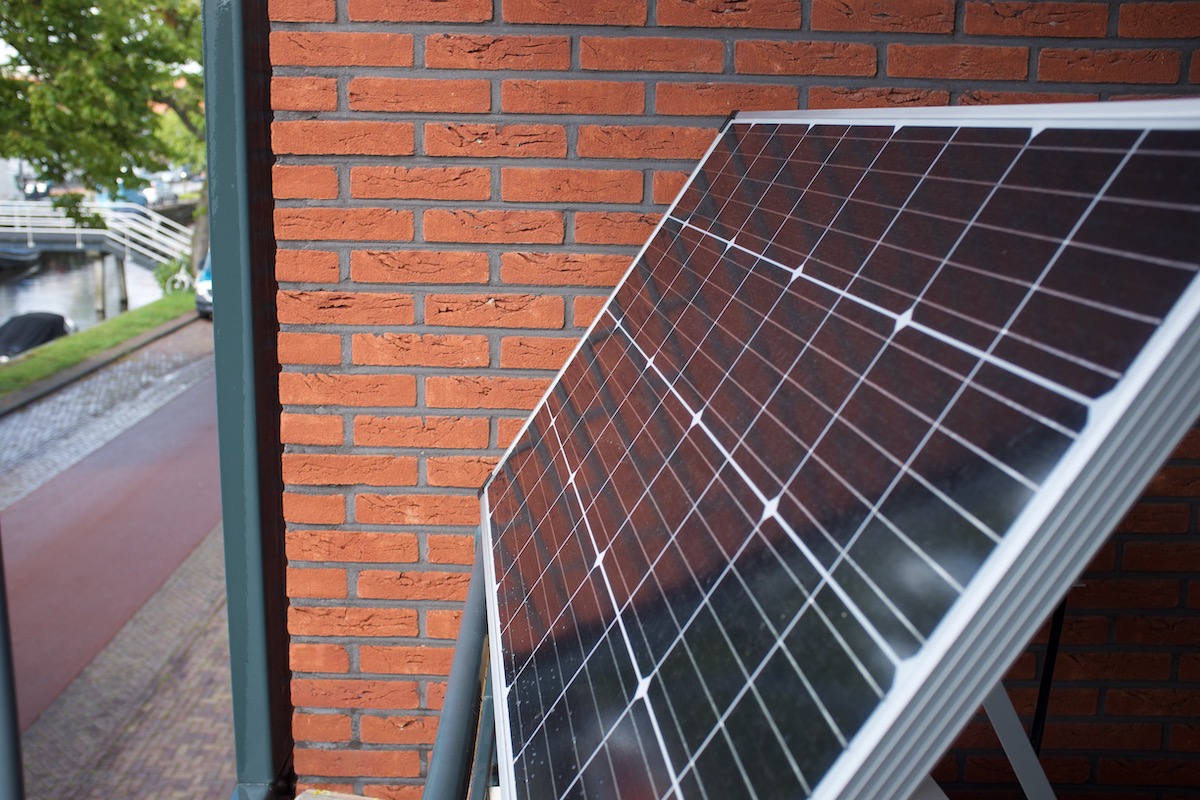
    As my solar setup could not keep the batteries charged from October onward, I decided to do something radical. I bought a 370 Watt4 solar panel (1690 x 1029 mm) and build a frame made of aluminium tubing5. Solar panels have become so cheap that the aluminium frame is more expensive than the panel.
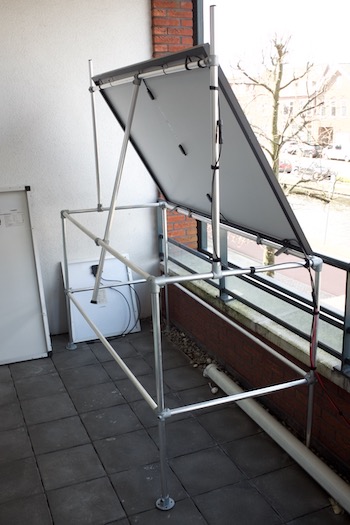
    solar contraption

    Even this 370 Watt panel was not enough during the gloomy, cloudy winter days. So I bought a second panel and build a second tube frame. Only with a 740 Watt rated solar panel setup was I able to power my Raspberry Pi through the winter6.

    I didn't create this over-powered setup just to power the Raspberry Pi during the winter. I knew that solar performed much better during spring and summer and I wanted to capture as much of that energy as possible. The real goal was to go beyond powering the Pi and power my computer desk, which includes an Intel Mac Mini, two 1440p 27" displays and some other components (using around 100 Watt on average)7.

    I would not be able to power my desk 24/7 but I would be happy if I can work on solar power for a few hours every other day during spring and summer. I also wanted to light my house in the evening using this setup.

    The original solar setup was enough to power the Raspberry Pi and charge an iPad in the spring/summer. The solar charge controller could not handle the increased solar capacity and needed replacement. So I decided to build a new setup inspired by Will Prowse solar demo setups, which is pictured below:
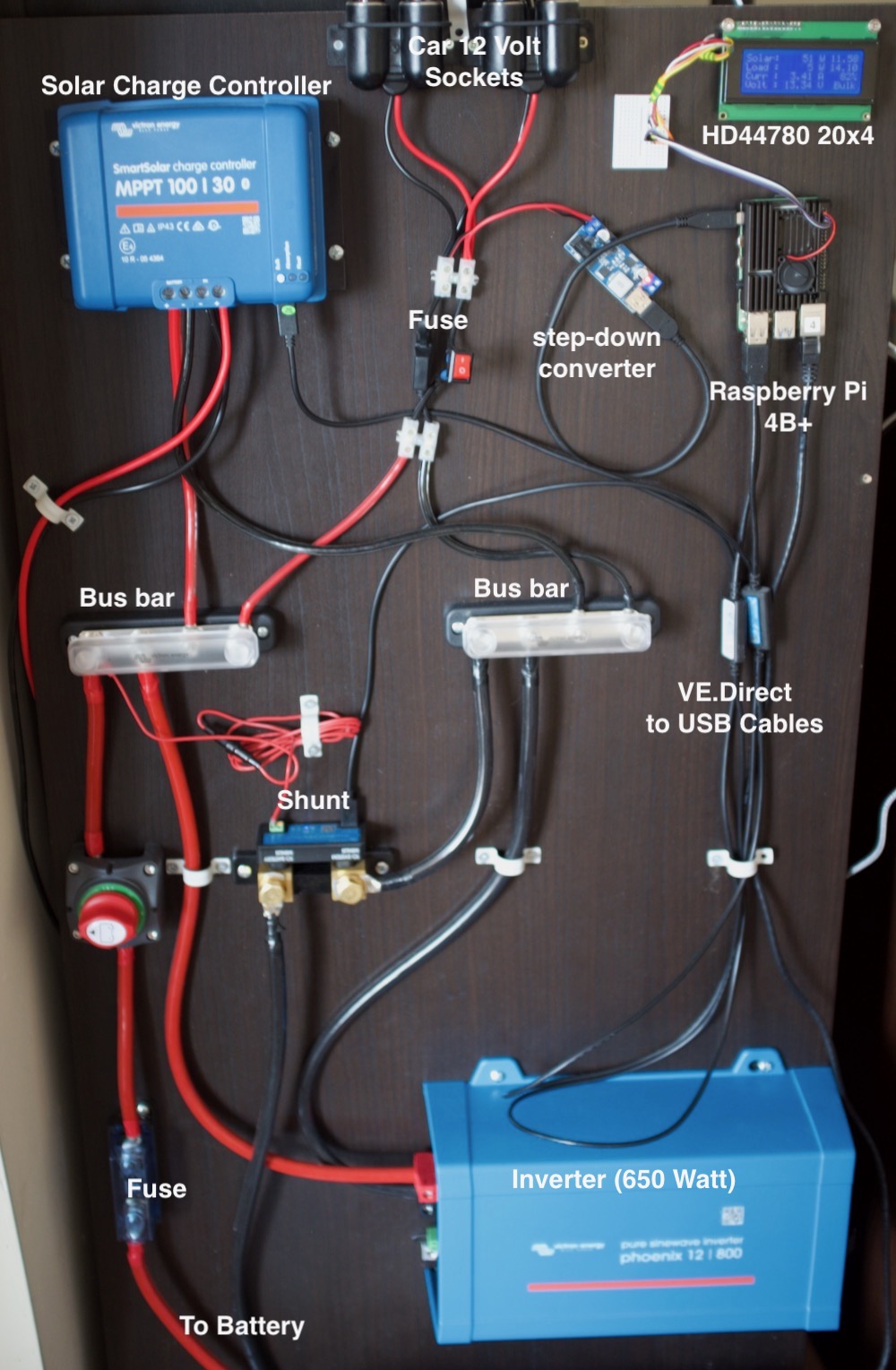
    solar contraption the latest iteration of my solar setup

    First a brief disclaimer: I'm a hobbyist, not an expert (if you didn't notice already). I have no background in electrical systems. I've tried to make my setup safe, but I may have done things that are not recommended.

    My setup is a 12-volt system8. The drawback of a 12-volt system is the relatively large currents required to charge the battery and power the inverter. This requires thicker, more expensive cabling to prevent energy losses in the cabling9.

    Most components are self-explanatory, except for the shunt. This device precisely measures battery voltage and how much current is going in and out of the battery. The solar charge controller and the shunt are linked together in a bluetooth network, so the solar controller uses the precise voltage and current information from the shunt to regulate the battery charging process.

    The solar controller, inverter and shunt have VE.direct interfaces (Victron-specific) which I use to collect data. I'm using a Python VE.direct module to gather this data, which just works without any issues. My Python script dumps the data into InfluxDB and I use Grafana for graphs (see below). The script also updates the 'solar status' bar to the right (or bottom for mobile users).
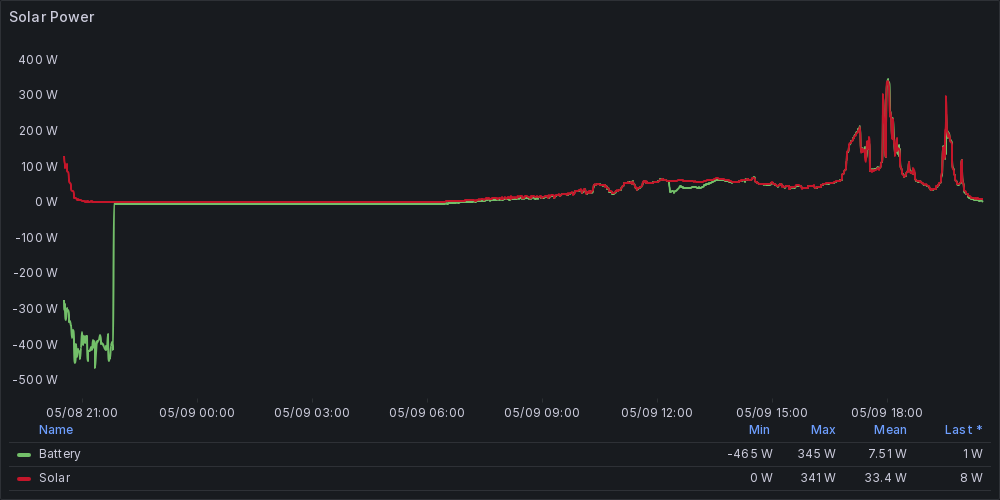
    grafana

    this image is updated periodically

    The LCD display is just for fun, and mostly to keep an eye on the battery charge state.
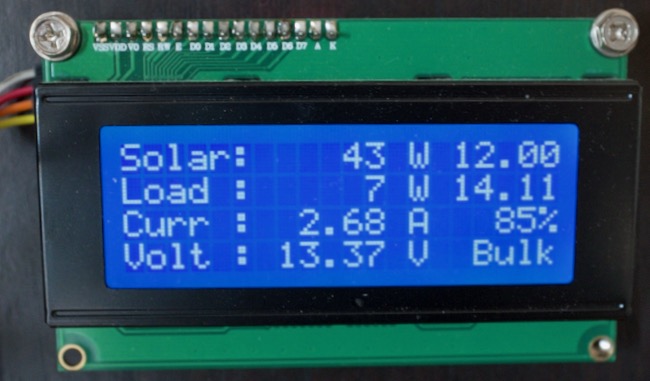
    solar contraption the 20x4 LCD screen

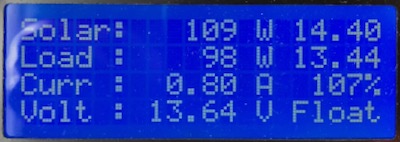
    The LCD screen is managed by the same python script that dumps the VE.direct data into Grafana. I focus on two metrics in particular. First of all the daily solar yield as a percentage: 100% means the load has been compensated by solar and anything higher means an energy 'profit'. In the bottom right we see the charger status (Bulk): if it's on 'Float' the battery is full. I tend to wait for the battery to recharge to a 'float' status before I use the inverter again.

    Let's talk about the battery. I've chosen to use a large used lead-acid battery even though Lithium (LiFePO4) batteries beat lead-acid in every metric.


    Update May 2023: I have since upgraded to Lithium Iron Phosphate, see this blogpost for more information.
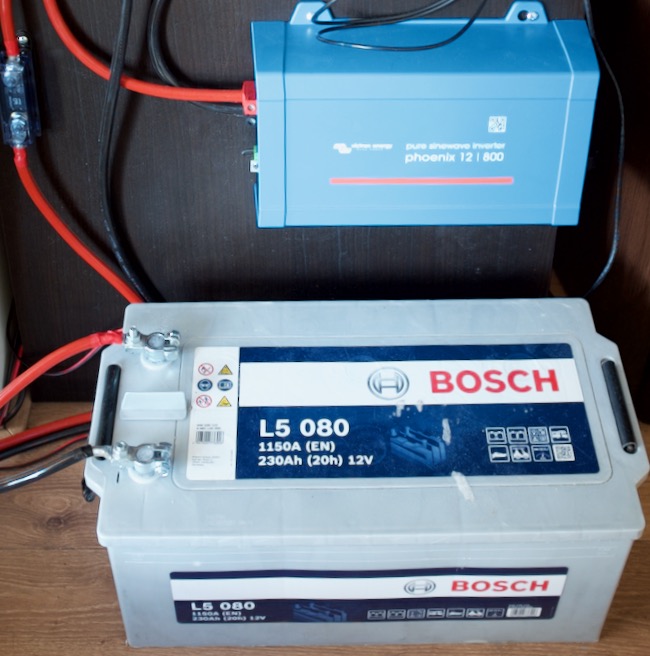

    solar contraption A 12 Volt 230 Ah lead-acid battery10

    I bought the battery11 second-hand for €100 so that's not a significant investment for a battery. Although it's a bit worn-down and the capacity is reduced, it is still good enough for me to run my computer setup for 10 hours after a full charge12. In practice, I won't use the battery for more than four to five hours at a time because recharging can take multiple days and lead-acid batteries should ideally be fully recharged within 24 hours or their aging is accelerated.

    The lead-acid battery also serves another purpose: is a relatively cheap option for me to validate my setup. If it works as intended, I might opt to upgrade to lithium (LiFePO4) at some point.

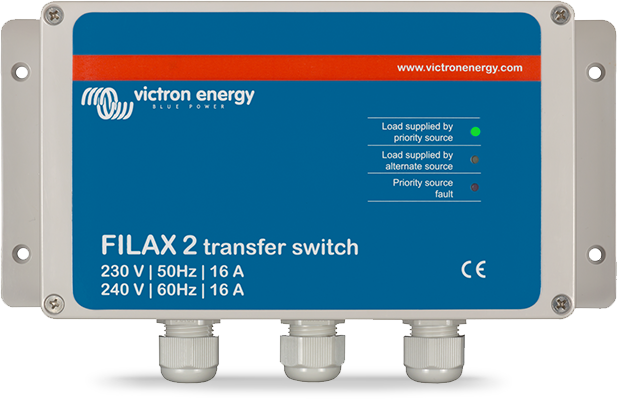
    Until recently, switching between the grid and solar for my computer setup was quite cumbersome. I had to power down all equipment, connect to the inverter and power everything up again. That got old very quickly. Fortunately, I stumbled on an advertisement for a Victron Filax 2 and it turns out that it does exactly what I need.
    solar contraption

    The Filax 2 switches between two 230 Volt input sources without any interruption, like a UPS (Uninterruptible power supply). Now that I've installed this device, I can switch between solar and grid power without any interruption. Brand new, The Filax 2 costs €350 which was beyond what I wanted to spend, but the second-hand price was acceptable.

    My solar setup is not something that I can just turn on and forget about. I have to keep an eye on the battery, especially because lead-acid should ideally be recharged within 24 hours.
    happy case

    Happy case: the battery is full and my computer desk is 100% solar-powered

    It's now April 2023 and my setup seems promising. Peak output of the two 370 Watt solar panels facing west was 230 Watts. Only for a very short period, but it makes me confident for spring and summer. I could automate enabling and disabling the inverter, with a relay and some logic in Python, but for now I'm good with manually operating the inverter.

    You may have noticed that I've used a lot of Victron equipment13. Mostly because it seems high-quality and the data interfaces are documented and easy-to-use. The inverter was also chosen because of the low parasitic load (self-consumption) of around 6 watt. Victron equipment is not cheap. Buying Victron gear second-hand can save a lot of money.

    Speaking of cost, if I include all the cost I made, including previous solar projects and mistakes, I think I spend around €2000.

    That's all I have to say about my hobby solar project for now.

    Link to Hacker News thread about this article.


    1. Their attempt was quite serious and precise. They accounted for the energy used to produce the equipment. They went as far as dithering images to reduce bandwidth and thus energy usage. 

    2. The cost can never be reclaimed by the electricity savings. Also, the energy produced to make all the components would never be recovered due to my west-facing setup. 

    3. never buy those cheap non-MPPT solar charge controllers unless you really know what you are doing. You are better off with a MPPT controller which is much better at getting the most energy out of a solar panel. 

    4. Jinko half cut 120 cell 370 WP JKM370N-6TL3-B 

    5. I have absolutely no experience with designing and building aluminium tube frames. After you're done laughing at this contraption, if you have a better, more efficient design, I'm still interested. 

    6. I may have cheated once by recharging the battery from the grid just to protect it against accelerated aging due to being in a prolonged (partially) discharged state. 

    7. Suddenly you realise that making the background on all monitors black saves ~20 Watt. My blog should be dark-themed to reduce energy usage 😅 

    8. If you ever intend to build some kind of solar setup yourself, consider a 24 Volt or ideally an 48 Volt system to reduce currents and thus save on cabling cost. 

    9. I've actually oversized the battery cabling for safety reasons. If a length of cable isn't rated for the current flowing through it, it becomes a resistor, generating heat, which can cause a fire so I want to be carefull. 

    10. The + and - pole are temporary uncovered for this picture, but normally they are covered to prevent a short-circuit if anything would fall on the poles. 

    11. A sealed lead-acid battery like the one I'm using is safe and won't release any (explosive) gasses unless overcharged or abused. 

    12. The inverter uses a dynamic load algorithm to prevent deep discharge of the battery. Ideally a lead-acid battery should never be discharged beyond 50% of capacity and it seems to work perfectly. Dumb inverters, just discharge until 10.5 volt under load, which means the battery is almost depleted, causing rapid aging and significantly reduced life-span. 

    13. No, I'm not sponsored by Victron, I wish 😅💸 

    Tagged as : Solar
    If you have any comments email me, see the About page for contact details.
  2. This Blog Is Now Running on Solar Power

    Mon 06 July 2020

    Introduction

    This blog is now running on solar power.

    I've put a solar panel on my balcony, which is connected to a solar charge controller. This device charges an old worn-out car battery and provides power to a Raspberry Pi ~~3b+~~ 4B, which in turn powers this (static) website.

    For updates: scroll to the bottom of this article.

    solar

    Some statistics about the current status of the solar setup is shown in the sidebar to the right. The historical graph below is updated every few minutes (European time).

    solarstatus

    Low-tech Magazine as inspiration

    If you think you've seen a concept like this before, you are right.

    The website Low-tech Magazine is the inspiration for my effort. I would really recommend visiting this site because it goes to incredible length to make the site energy-efficient. For example, images are dithered to save on bandwidth!

    Low-tech Magazine goes off-line when there isn't enough sunlight and the battery runs out, which can happen after a few days of bad weather.

    In January 2020, the site shared some numbers about the sustainability of the solar-powered website.

    The build

    My build is almost identical to that of Low-tech Magazine in concept, but not nearly as efficient. I've just performed a lift-and-shift of my blog from the cloud to a Raspberry Pi.

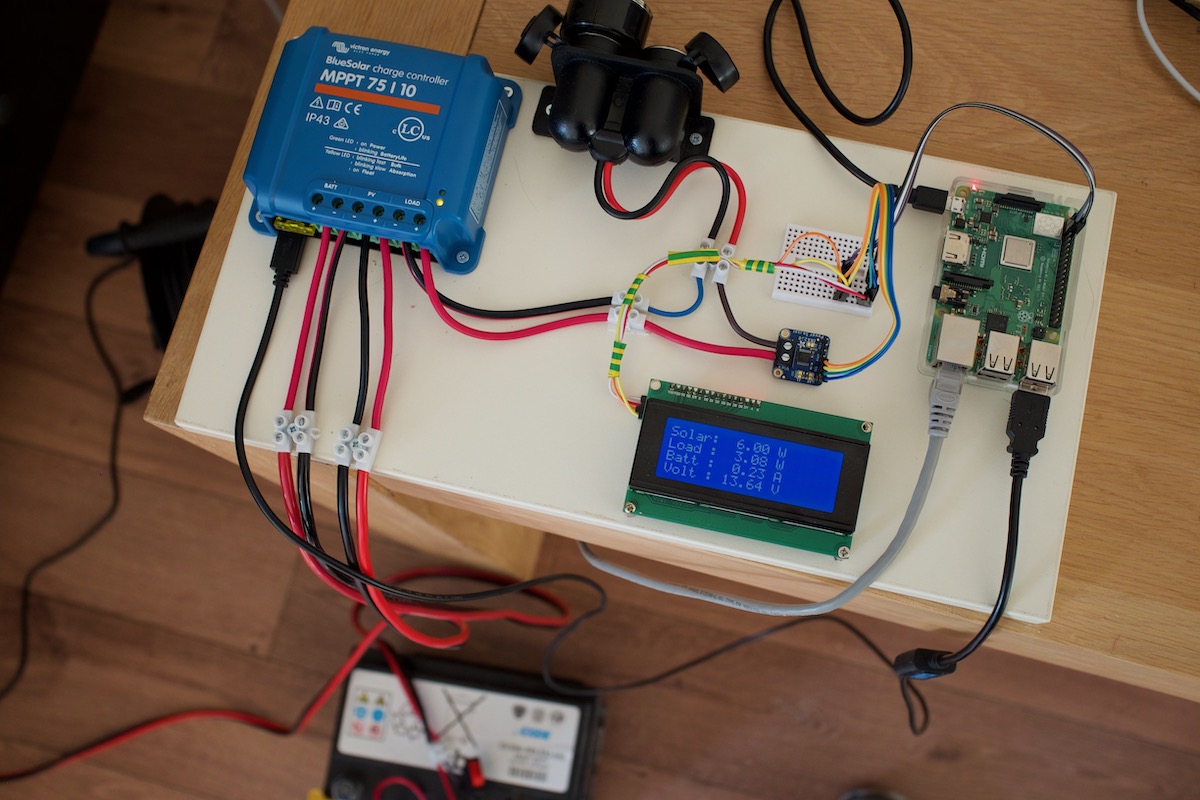
    I've build my setup based on some parts I already owned, such as the old car battery and the Pi. The solar panel and solar charge controller were purchased new. The LCD display and current/voltage sensor have been recycled from an earlier hobby project.

    controller

    I've used these parts:

    Solar PanelMonocrystalline 150 Watt 12V
    Battery12 Volt Lead Acid Battery (Exide 63Ah)
    Solar Charge ControllerVictron BlueSolar MPPT 75|10
    Voltage/Current sensorINA260
    LCD DisplayHD44780 20x4
    ComputerRaspberry Pi 4B
    Communications cableVE.Direct to USB interface

    The Solar Panel

    The panel is extremely over-dimensioned because my balcony is directed towards the west, so it has only a few hours a day of direct sunlight. Furthermore, the angle of the solar panel is sub-optimal.

    My main concern will be the winter. It is not unlikely that during the winter, the panel will not be able to generate enough energy to power the Pi and charge the battery for the night.

    I have also noticed that under great sunlight conditions, the panel can easily produce 60+ Watt1 but the battery cannot ingest power that fast.

    I'm not sure about the actual brand of the panel, it was the cheapest panel I could find on Amazon for the rated wattage.

    The Solar Charger

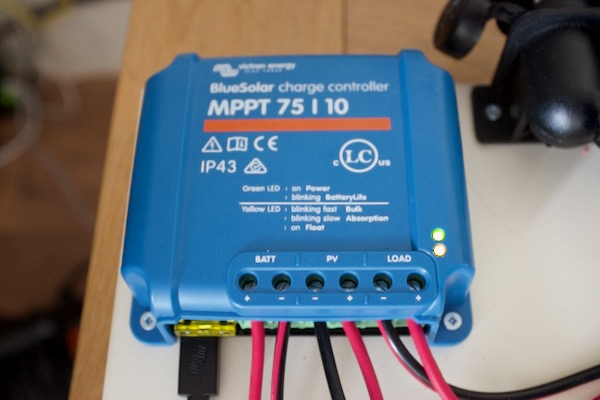
    It's a standard solar charger made by Victron, for small solar setups (to power a shed or mobile home). I've bought the special data cable2 so I can get information such as voltage, current and power usage.

    chargecontroller

    The controller uses a documented protocol called ve.direct. I'm using a Python module to obtain the data.

    According to the manual, this solar charger will assure that the battery is sufficiently charged and protects against deep discharge or other conditions that could damage the battery.

    I feel that this is a very high-quality product. It seems sturdy and the communications port (which even supports a bluetooth dongle) giving you access to the data is really nice.

    The controller is ever so slightly under-dimensioned for the solar panel, but since I will never get the theoretical full power of the panel due to the sub-optimal configuration, this should not be an issue.

    The battery

    In the day and age of Lithium-ion batteries it may be strange to use a Lead Acid battery. The fact is that this battery3 was free and - although too worn down for a car - can still power light loads for a very long time (days). And I could just hook up a few extra batteries to expand capacity (and increase solar energy absorption rates).

    To protect against short-circuits, the battery is protected by a fuse. This is critical because car batteries can produce so much current that they can be used for welding. They are dangerous.

    If you ever work with lead acid batteries, know this: don't discharge them beyond 50% of capacity, and ideally not beyond 70% of capacity. The deeper the discharge, the lower the life expectancy. A 100% discharge of a lead acid battery will kill it very quickly.

    You may understand why Lead Acid batteries aren't that great for solar usage, because you need to buy enough of them to assure you never have to deep discharge them.

    Voltage, Current and Power Sensor

    I noticed that the load current sensor of the solar charge controller was not very precise, so I added an INA260 based sensor. This sensor uses I2C for communication, just like the LCD display. It measures voltage, current and power in a reasonable presice resolution.

    Using the sensor is quite simple (pip3 install adafruit-circuitpython-ina260):

    1
    2
    3
    4
    5
    6
    7
    8
    #!/usr/bin/env python3
    import board
    import adafruit_ina260
    i2c = board.I2C()
    ina260_L = adafruit_ina260.INA260(i2c,address=64)
    print(ina260_L.current)
    print(ina260_L.voltage)
    print(ina260_L.power)
    

    Please note that this sensor is purely optional, the precision it provides is not really required. I've used this sensor to observe that the voltage and current sensing sensors of the solar charge controller are fairly accurate, except for that of the load, which only measures the current in increments of 100 mAh.

    The LCD Display

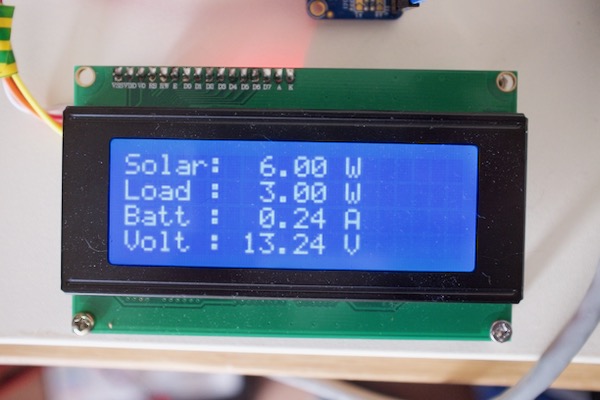
    The display has four lines of twenty characters and uses a HD44780 controller. It's dirt-cheap and uses the I2C bus for communications. By default, the screen is very bright, but I've used a resistor on a header for the backlight to lower the brightness.

    lcddisplay

    I'm using the Python RPLCD library (pip3 install RPLCD) for interfacing with the LCD display.

    Using an LCD display in any kind of project is very simple.

    1
    2
    3
    4
    5
    6
    #!/usr/bin/env python3
    from RPLCD.i2c import CharLCD
    lcd = CharLCD('PCF8574', 0x27, cols=20, rows=4)
    lcd.clear()
    lcd.cursor_pos = (0,0) # (line,column)
    lcd.write_string("Hello")
    

    12 volt to 5 Volt conversion

    I'm just using a simple car cigarette lighter USB adapter to power the Raspberry Pi. I'm looking at a more power-efficient converter, although I'm not sure how much efficiency I'll be able to gain, if any.

    Update: I've replaced the cigarette lighter usb adapter device with a buck converter, which resulted in a very slight reduction in power consumption.

    Script to collect data

    I've written a small Python script to collect all the data. The data is send to two places:

    • It is send to Graphite/Grafana for nice charts (serves no real purpose)
    • It is used to generate the infographic in the sidebar to the right

    Because I don't want to wear out the SD card of the Raspberry Pi, the stats as shown in the sidebar to the right is written to a folder that is mounted on tmpfs.

    The cloud as backup

    When you connect to this site, you connect to a VPS running HAProxy. HAproxy determines if my blog is up and if so, will proxy between you and the Raspberry Pi. If the battery would run out, HAProxy will redirect you an instance of my blog on the same VPS (where it was running for years).

    As you may understand, I still have to pay for the cloud VPS and that VPS also uses power. From an economical standpoint and from a ecological standpoint, this project may make little sense.

    Possible improvements

    VPS on-demand

    The obvious flaw in my whole setup is the need for a cloud VPS that is hosting HAProxy and a backup instance of my blog.

    A better solution would be to only spawn a cloud VPS on demand, when power is getting low. To move visitors to the VPS, the DNS records should be changed to point to the right IP-address, which could be done with a few API calls.

    I could also follow the example of Low-tech Magazine and just accept that my blog would be offline for some time, but I don't like that.

    Switching to Lithium-ion

    As long as the car battery is still fine, I have no reason to switch to Lithium-ion. I've also purchased a few smaller Lead Acid batteries just to test their real-life capacity, to support projects like these. Once the car battery dies, I can use those to power this project.

    The rest of the network is not solar-powered

    The switches, router and modem that supply internet access are not solar-powered. Together, these devices use significantly more power, which I cannot support with my solar setup.

    I would have to move to a different house to be able to install sufficient solar capacity.

    Other applications

    During good weather conditions, the solar panel provides way more power than is required to keep the battery charged and run the Raspberry Pi.

    I've used the excess energy to charge my mobile devices. Although I think that's fun, if I just forget turning off my lights or amplifier for a few hours, I would already waste most of my solar gains.

    I guess it's the tought that counts.

    Conclusion

    In the end, it it was a fun hobby project for me to realise. I want to thank Low-tech Magazine for the idea, I had a lot of fun creating my (significantly worse) copy of it.

    If you have any ideas on how to improve this project, feel free to comment below or email me.

    This blog post featured on hacker news and the Pi 3b+ had no problems handling the load.

    Updates

    Car battery died

    After about two weeks the old and worn-down car battery finally died. Even after a whole day of charging, the voltage of the battery dropped to 11.5 Volts in about a minute. It would no longer hold a charge.

    I have quite a lot of spare 12 volt 7Ah batteries that I can use as a replacement. I'm now using four of those batteries (older ones) in parallel.

    Added wall charger as backup power (October 2020)

    As we approached fall, the sun started to set earlier and earlier. The problem with my balcony is that I only have direct sunlight at 16:00 until sunset. My solar panel was therefore unable to keep the batteries charged.

    I even added a smaller 60 watt solar panel I used for earlier tests in parallel to gain a few extra watts, but that didn't help much.

    It is now at a point where I think it's reasonable to say that the project failed in my particular case. However, I do believe it would still be fine if I could capture the sun during the whole day (if my balcony wasn't in such a bad spot, the solar panel would be able to keep up).

    As the batteries were draining I decided to implement a backup power solution, to protect the batteries. It's bad for lead acid batteries to be in a discharged state for a long time.

    Therefore, I'm now using a battery charger that is connected to a relais that my software is controlling. If the voltage drops below 12.00 volt, it will start charging the batteries for 24 hours.

    Upgraded Raspberry Pi 3b+ to a Raspberry Pi 4B (May 2022)

    The idle power usage of the 4B is almost the same as the 3b+ model, although it requires some tweaking to reduce power usage.

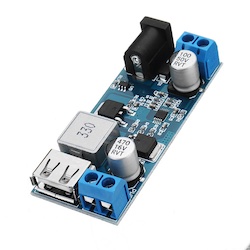
    The old 3b+ continuously complained about under voltage (detected), but the Pi4 seems to be less picky and it works fine with the XY-3606 power converter (12V to 5V).

    xy3606


    1. the position of the panel is not optimal, so I will never get the panel's full potential. 

    2. You don't have to buy the cable supplied by Victron, it's possible to create your own. The cable is not proprietary. 

    3. It failed. Please read the update at the bottom of this article. 

    Tagged as : solar
    If you have any comments email me, see the About page for contact details.

Page 2 / 2