1. Monitoring HP MSA P2000 G3 I/O Latency With Nagios

    Tue 04 February 2014

    At work we have a couple of HP MSA P2000 G3 SANs. These are entry-level SANs that still seem to have almost all features you might want from a SAN, except for official SSD-support.

    It seems that the new MSA 2040 adds support for SSDs and also provides 4 GB cache per controller instead of the somewhat meager 2GB of the P2000.

    Anyway, a very nice feature of the MSA P2000 G3 is the fact that the management interface also provides a well-documented API that allows you to collect detailed stats on subjects like:

    • Overall enclosure status
    • Reports on failed drives
    • Controller CPU usage
    • IOPs per controller
    • IOPs per vdisk
    • IOPs per disk

    Thomas Weaver has written a Nagios plugin that does that: it collects this information and in turn you can graph it with pnp4nagios.

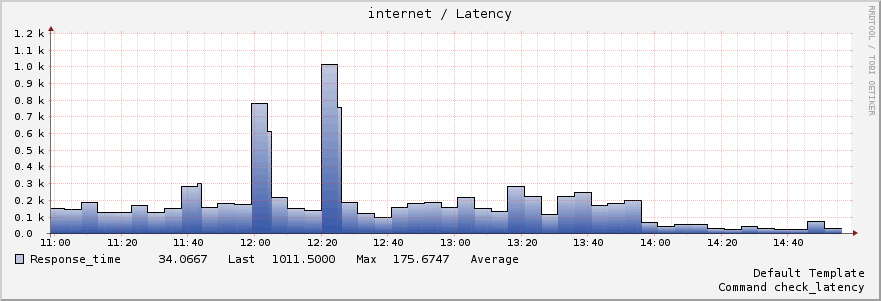
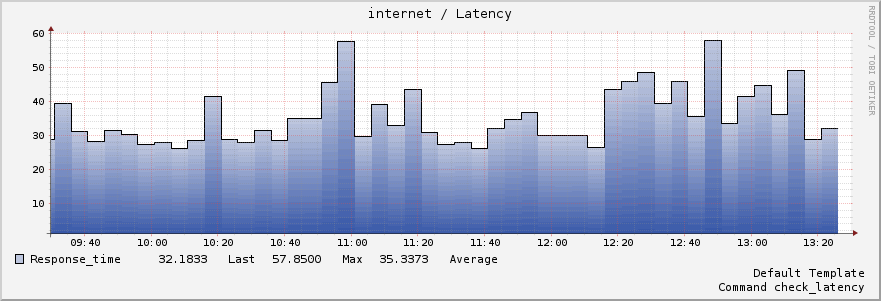
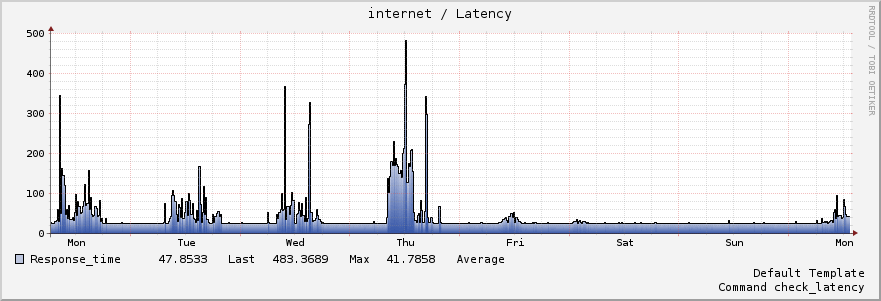
    In more recent firmware updates HP has added support to monitor read and write I/O latency per vdisk. Latency is an important indicator for application-level performance so I was quite happy with that.

    As the plugin by Thomas did not support reading these parameters yet, I spend some time implementing this check and submitted this new version of check_p2000_api.php back to Thomas.

    Read Latency of a RAID 6 array

    readlatency

    Write Latency of a RAID 6 array

    readlatency

    You will notice that the write latency of this disk array is very high at times, which seem to indicate that this vdisk is taxed too much with too many I/O-requests.

    I'd like to thank Thomas Weaver for writing this plugin, I think it's very useful.

    Tagged as : Storage Nagios
    If you have any comments email me, see the About page for contact details.
  2. Creating a Basic ZFS File System on Linux

    Sat 01 February 2014

    Here are some notes on creating a basic ZFS file system on Linux, using ZFS on Linux.

    I'm documenting the scenario where I just want to create a file system that can tollerate at least a single drive failure and can be shared over NFS.

    Identify the drives you want to use for the ZFS pool

    The ZFS on Linux project advices not to use plain /dev/sdx (/dev/sda, etc.) devices but to use /dev/disk/by-id/ or /dev/disk/by-path device names.

    Device names for storage devices are not fixed, so /dev/sdx devices may not always point to the same disk device. I've been bitten by this when first experimenting with ZFS, because I did not follow this advice and then could not access my zpool after a reboot because I removed a drive from the system.

    So you should pick the appropriate device from the /dev/disk/by-[id|path] folder. However, it's often difficult to determine which device in those folders corresponds to an actual disk drive.

    So I wrote a simple tool called showdisks which helps you identify which identifiers you need to use to create your ZFS pool.

    diskbypath

    You can install showdisks yourself by cloning the project:

    git clone https://github.com/louwrentius/showtools.git
    

    And then just use showdisks like

    ./showdisks -sp  (-s (size) and -p (by-path) )
    

    For this example, I'd like to use all the 500 GB disk drives for a six-drive RAIDZ1 vdev. Based on the information from showdisks, this is the command to create the vdev:

    zfs create tank raidz1 pci-0000:03:00.0-scsi-0:0:21:0 pci-0000:03:00.0-scsi-0:0:19:0 pci-0000:02:00.0-scsi-0:0:9:0 pci-0000:02:00.0-scsi-0:0:11:0 pci-0000:03:00.0-scsi-0:0:22:0 pci-0000:03:00.0-scsi-0:0:18:0
    

    The 'tank' name can be anything you want, it's just a name for the pool.

    Please note that with newer bigger disk drives, you should test if the ashift=12 option gives you better performance.

    zfs create -o ashift=12 tank raidz1 <devices>
    

    I used this option on 2TB disk drives and the performance and the read performance improved twofold.

    How to setup a RAID10 style pool

    This is how to create the ZFS equivalent of a RAID10 setup:

    zfs create tank mirror <device 1> <device 2> mirror <device 3> <device 4> mirror <device 5> <device 6>
    

    How many drives should I use in a vdev

    I've learned to use a 'power of two' (2,4,8,16) of drives for a vdev, plus the appropriate number of drives for the parity. RAIDZ1 = 1 disk, RAIDZ2 = 2 disks, etc.

    So the optimal number of drives for RAIDZ1 would be 3,5,9,17. RAIDZ2 would be 4,6,10,18 and so on. Clearly in the example above with six drives in a RAIDZ1 configuration, I'm violating this rule of thumb.

    How to disable the ZIL or disable sync writes

    You can expect bad throughput performance if you want to use the ZIL / honour synchronous writes. For safety reasons, ZFS does honour sync writes by default, it's an important feature of ZFS to guarantee data integrity. For storage of virtual machines or databases, you should not turn of the ZIL, but use an SSD for the SLOG to get performance to acceptable levels.

    For a simple (home) NAS box, the ZIL is not so important and can quite safely be disabled, as long as you have your servers on a UPS and have it cleanly shutdown when the UPS battery runs out.

    This is how you turn of the ZIL / support for synchronous writes:

    zfs set sync=disabled <pool name>
    

    Disabling sync writes is especially important if you use NFS which issues sync writes by default.

    Example:

    zfs set sync=disabled tank
    

    How to add an L2ARC cache device

    Use showdisks to lookup the actual /dev/disk/by-path identifier and add it like this:

    zpool add tank cache <device>
    

    Example:

    zpool add tank cache pci-0000:00:1f.2-scsi-2:0:0:0
    

    This is the result (on another zpool called 'server'):

    root@server:~# zpool status
      pool: server
     state: ONLINE
      scan: none requested
    config:
    
        NAME                               STATE     READ WRITE CKSUM
        server                             ONLINE       0     0     0
          raidz1-0                         ONLINE       0     0     0
            pci-0000:03:04.0-scsi-0:0:0:0  ONLINE       0     0     0
            pci-0000:03:04.0-scsi-0:0:1:0  ONLINE       0     0     0
            pci-0000:03:04.0-scsi-0:0:2:0  ONLINE       0     0     0
            pci-0000:03:04.0-scsi-0:0:3:0  ONLINE       0     0     0
            pci-0000:03:04.0-scsi-0:0:4:0  ONLINE       0     0     0
            pci-0000:03:04.0-scsi-0:0:5:0  ONLINE       0     0     0
        cache
          pci-0000:00:1f.2-scsi-2:0:0:0    ONLINE       0     0     0
    

    How to monitor performance / I/O statistics

    One time sample:

    zpool iostat
    

    A sample every 2 seconds:

    zpool iostat 2
    

    More detailed information every 5 seconds:

    zpool iostat -v 5
    

    Example output:

                                          capacity     operations    bandwidth
    pool                               alloc   free   read  write   read  write
    ---------------------------------  -----  -----  -----  -----  -----  -----
    server                             3.54T  7.33T      4    577   470K  68.1M
      raidz1                           3.54T  7.33T      4    577   470K  68.1M
        pci-0000:03:04.0-scsi-0:0:0:0      -      -      1    143  92.7K  14.2M
        pci-0000:03:04.0-scsi-0:0:1:0      -      -      1    142  91.1K  14.2M
        pci-0000:03:04.0-scsi-0:0:2:0      -      -      1    143  92.8K  14.2M
        pci-0000:03:04.0-scsi-0:0:3:0      -      -      1    142  91.0K  14.2M
        pci-0000:03:04.0-scsi-0:0:4:0      -      -      1    143  92.5K  14.2M
        pci-0000:03:04.0-scsi-0:0:5:0      -      -      1    142  90.8K  14.2M
    cache                                  -      -      -      -      -      -
      pci-0000:00:1f.2-scsi-2:0:0:0    55.9G     8M      0     70    349  8.69M
    ---------------------------------  -----  -----  -----  -----  -----  -----
    

    How to start / stop a scrub

    Start:

    zfs scrub <pool>
    

    Stop:

    zfs scrub -s <pool>
    

    Mount ZFS file systems on boot

    Edit /etc/defaults/zfs and set this parameter:

    ZFS_MOUNT='yes'
    

    How to enable sharing a file system over NFS:

    zfs set sharenfs=on <poolname>
    

    How to create a zvol for usage with iSCSI

    zfs create -V 500G <poolname>/volume-name
    

    How to force ZFS to import the pool using disk/by-path

    Edit /etc/default/zfs and add

    ZPOOL_IMPORT_PATH=/dev/disk/by-path/
    

    Links to important ZFS information sources:

    Tons of information on using ZFS on Linux by Aaron Toponce:

    https://pthree.org/2012/04/17/install-zfs-on-debian-gnulinux/

    Understanding the ZIL (ZFS Intent Log)

    http://nex7.blogspot.nl/2013/04/zfs-intent-log.html

    Information about 4K sector alignment problems

    http://www.opendevs.org/ritk/zfs-4k-aligned-space-overhead.html

    Important read about using the proper number of drives in a vdev

    http://forums.freenas.org/threads/getting-the-most-out-of-zfs-pools.16/

    Tagged as : ZFS
    If you have any comments email me, see the About page for contact details.

Page 37 / 115