The VRRP or Virtual Router Redundancy Protocol helps you create a reliable network by using multiple routers in an active/passive configuration. If the primary router fails, the backup router takes over almost seamlessly.
This is how VRRP works:
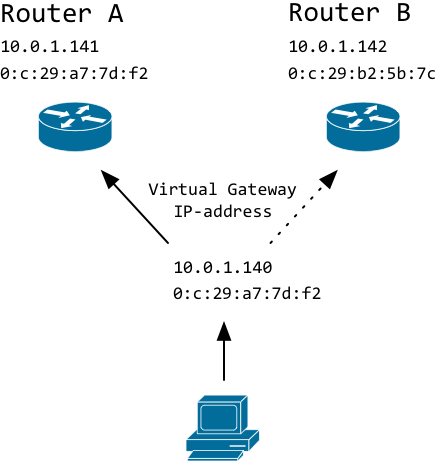
Clients connect to a virtual IP-address. It is called virtual because the IP-address is not hard-coded to a particular interface on any of the routers.
If a client asks for the MAC-address that is tied to the virtual IP, the master will respond with its MAC-address. If the master dies, the backup router will notice and start responding to ARP-requests.
Let's take a look at the ARP table on the client to illustrate what is happening.
Master is active:
(10.0.1.140) at 0:c:29:a7:7d:f2 on en0 ifscope [ethernet]
(10.0.1.141) at 0:c:29:a7:7d:f2 on en0 ifscope [ethernet]
(10.0.1.142) at 0:c:29:b2:5b:7c on en0 ifscope [ethernet]
Master has failed and backup has taken over:
(10.0.1.140) at 0:c:29:b2:5b:7c on en0 ifscope [ethernet]
(10.0.1.141) at 0:c:29:a7:7d:f2 on en0 ifscope [ethernet]
(10.0.1.142) at 0:c:29:b2:5b:7c on en0 ifscope [ethernet]
Notice how the MAC-address of the virtual IP (.140) is now that of the backup router.
Configuring VRRP on Linux
-
configure static IP-addresses on the primary and backup router. Do not configure the virtual IP on any of the interfaces. In my test environment, I used 10.0.1.141 for the master and 10.0.1.142 for the backup router.
-
Because the virtual IP-address is not configured on any of the interfaces, Linux will not reply to any packets destined for this IP. This behaviour needs to be changed or VRRP will not work. Edit /etc/sysctl.conf and add this line:
net.ipv4.ip_nonlocal_bind=1
-
Run this command to active this setting:
-
Install Keepalived
apt-get install keepalived
-
Sample configuration of /etc/keepalived/keepalived.conf for MASTER
vrrp_instance VI_1 {
    interface eth0
    state MASTER
    virtual_router_id 51
    priority 101

    authentication {
        auth_type AH
        auth_pass monkey
    }

    virtual_ipaddress {
        10.0.1.140
    }
}
-
Sample configuration of /etc/keepalived/keepalived.conf for SLAVE
vrrp_instance VI_1 {
    interface eth0
    state BACKUP
    virtual_router_id 51
    priority 100

    authentication {
        auth_type AH
        auth_pass monkey
    }

    virtual_ipaddress {
        10.0.1.140
    }
}
-
Start keepalived:
The only configuration difference regarding keepalived between the master and the standby router is the 'priority' setting. The master server should have a higher priority than the backup router (101 vs. 100).
As there can be multiple VRRP configurations active within the same subnet, it is important that you make sure that you set a unique virtual_router_id.
Please do not forget to set your own password in case you enable authentication.
VRRP failover example
This is what happens if the master is shutdown:
64 bytes from 10.0.1.140: icmp_seq=148 ttl=64 time=0.583 ms
64 bytes from 10.0.1.140: icmp_seq=149 ttl=64 time=0.469 ms
64 bytes from 10.0.1.140: icmp_seq=150 ttl=64 time=0.267 ms
Request timeout for icmp_seq 151
Request timeout for icmp_seq 152
Request timeout for icmp_seq 153
Request timeout for icmp_seq 154
64 bytes from 10.0.1.140: icmp_seq=155 ttl=64 time=0.668 ms
64 bytes from 10.0.1.140: icmp_seq=156 ttl=64 time=0.444 ms
64 bytes from 10.0.1.140: icmp_seq=157 ttl=64 time=0.510 ms
After about five seconds (default) the standby router takes over and starts responding to the virtual IP.
Security
A host within the same subnet could just spoof VRRP packets and disrupt service.
An attack on VRRP is not just theoretical. A tool called Loki allows you to take over the virtual IP-address and become the master router. This will allow you to create a DoS or sniff all traffic.
VRRP security is also discussed in this document from the Loki developers.
According to rfc3768 authentication and security has been deliberately omitted (see section 10 Security Considerations) from newer versions of the VRRP protocol RFC.
The main argument is that any malicious device in a layer 2 network can stage similar attacks focussing on ARP-spoofing and ARP-poisoning so as the fundament is already insecure, why care about VRRP?
I understand the reasoning but I disagree. If you do have a secure Layer 2 environment, VRRP becomes the weakest link. Either you really need to filter out VRRP traffic originating from untrusted ports/devices, or implement security on VRRP itself.
Attacking VRRP with Loki
I have actually used Loki on VRRP and I can confirm it works (at least) as a Denial-of-Service tool.
I used Kali (Formerly known as Back-Track) and installed Loki according to these instructions. Please note the bottom of the page.
What I did on Kali Linux:
apt-get install python-dpkt python-dumbnet
wget http://c0decafe.de/svn/codename_loki/packages/kali-1/pylibpcap_0.6.2-1_amd64.deb
wget http://c0decafe.de/svn/codename_loki/packages/kali-1/loki_0.2.7-1_amd64.deb
dpkg -i pylibpcap_0.6.2-1_amd64.deb
dpkg -i loki_0.2.7-1_amd64.deb
Then just run:
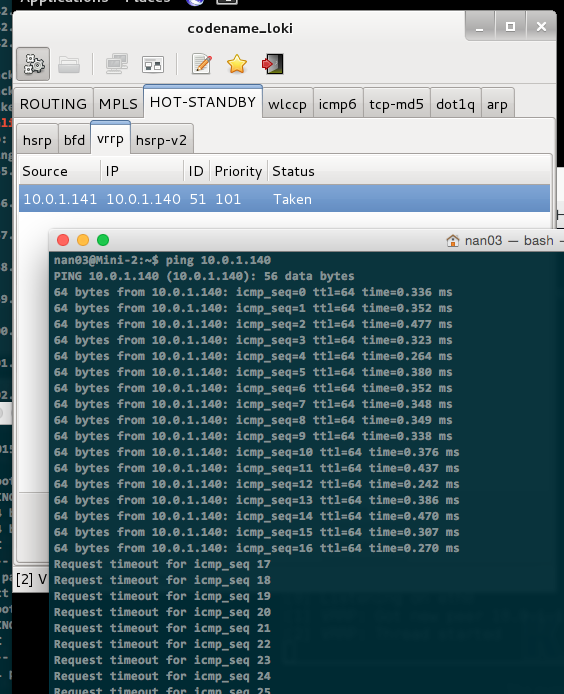
This is only an issue if you already protected yourself against ARP- and IP-spoofing attacks.
Protecting VRRP against attacks
Keepalived offers two authentication types regarding VRRP:
- PASS (plain-text password)
- AH (IPSEC-AH (authentication header))
The PASS option is totally useless from a security perspective.
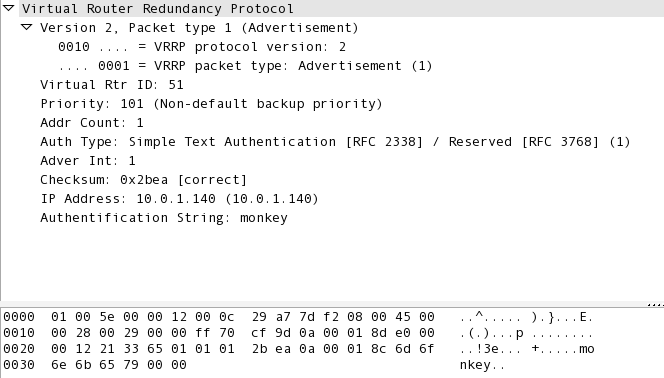
As you can see, the password 'monkey' is visible and easily obtained from the VRRP multicast advertisements. So to me, it does not make sense to use this option. Loki just replayed the packets and could still create a DoS.
So we are left with IPSEC-AH, wich is more promising as it actually does some cryptography using the IPSEC protocol, so there is no clear-text password to be captured. I'm not a crypto expert, so I'm not sure how secure this implementation is. Here is some more info on IPSEC-AH as implemented in Keepalived.
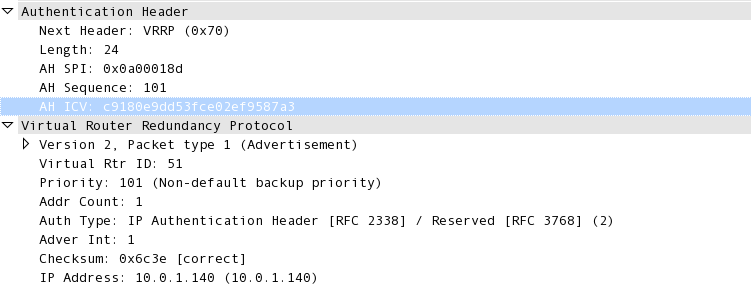
If I configure AH authentication, the Loki tool does not recognise the VRRP trafic anymore and it's no longer possible to use this simple script-kiddie-friendly tool to attack your VRRP setup.
IPSEC-AH actually introduces an IPSEC-AH header between the IP section and the VRRP section of a packet, so it changes the packet format, which probably makes it unrecognisable for Loki.
Running VRRP multicast traffic on different network segments
It has been pointed out to me by XANi_ that it is possible with Keepalived to keep the virtual IP-address and the VRRP multicast traffic in different networks. Clients will therefore not be able to attack the VRRP traffic.
In this case, security on the VRRP traffic is not relevant anymore and you don't really need to worry about authentication, assuming that untrusted devices don't have access to that 'VRRP' VLAN.
Th first step is that both routers should have their physical interface in the same (untagged) VLAN. The trick is then to specify the virtual IP-addresses in the appropriate VLANs like this example:
virtual_ipaddress {

    10.0.1.1/24 dev eth0.100
    10.0.2.1/24 dev eth0.200
}
In this example, virtual IP 10.0.1.1 is tied to VLAN 100 and 10.0.2.1 is tied to VLAN 200.
If the physical router interfaces are present in the untagged VLAN 50 (example), the VRRP multicast traffic will only be observed in this VLAN.
Some background information on working with VLANs and Keepalived.
Firewall configuration
Update August 2018:
I had problems running VRRP on Red Hat / CentOS. Since I use AH authentication, the protocol is not seen as VRRP but (as TCPDUMP shows) "AH". This is why you need to create a service for Firewalld and enable it for the appropriate zone.
- Create a file called "VRRP.xml" in /etc/firewalld/services
    <?xml version="1.0" encoding="utf-8"?>
    <service>
        <short>VRRP</short>
        <description>Virtual Router Redundancy Protocol</description>
        <port protocol="ah" port=""/>
    </service>
- Enable VRRP (select the appropriate zone for your interface):
sudo firewall-cmd --zone=public --permanent --add-service=VRRP
- Reload the configuration
sudo firewall-cmd --reload
- check that the service is active with:
sudo firewall-cmd --zone=public --list-services
Closing words
VRRP can provide a very simple solution to setup a high-availability router configuration. Security can be a real issue if untrusted devices reside in the same layer 2 network so implementing security with IPSEC-AH or network segmentation is recommended.
If you have any comments email me, see the About page for contact details.

