InfiniBand networking is quite awesome. It's mainly used for two reasons:
- low latency
- high bandwidth
As a home user, I'm mainly interested in setting up a high bandwidth link between two servers.
I was using quad-port network cards with Linux Bonding, but this solution has some downsides:
- you can only go to 4 Gbit with Linux bonding (or you need more ports)
- you need a lot of cabling
- it is similar in price as InfiniBand
So I've decided to take a gamble on some InfiniBand gear. You only need InfiniBand PCIe network cards and a cable.
1 x SFF-8470 CX4 cable                                              $16
2 x MELLANOX DUAL-PORT INFINIBAND HOST CHANNEL ADAPTER MHGA28-XTC   $25
                                                            Total:  $66
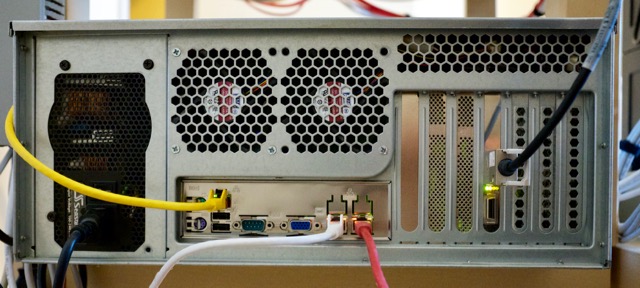
I find $66 quite cheap for 20 Gbit networking. Regular 10Gbit Ethernet networking is often still more expensive that using older InfiniBand cards.
InfiniBand is similar to Ethernet, you can run your own protocol over it (for lower latency) but you can use IP over InfiniBand. The InfiniBand card will just show up as a regular network device (one per port).
ib0 Link encap:UNSPEC HWaddr 80-00-04-04-FE-80-00-00-00-00-00-00-00-00-00-00
      inet addr:10.0.2.3  Bcast:10.0.2.255  Mask:255.255.255.0
      inet6 addr: fe80::202:c902:29:8e01/64 Scope:Link
      UP BROADCAST RUNNING MULTICAST  MTU:65520  Metric:1
      RX packets:7988691 errors:0 dropped:0 overruns:0 frame:0
      TX packets:17853128 errors:0 dropped:10 overruns:0 carrier:0
      collisions:0 txqueuelen:256
      RX bytes:590717840 (563.3 MiB)  TX bytes:1074521257501 (1000.7 GiB)
Configuration
I've followed these instructions to get IP over InfiniBand working.
Modules
First, you need to assure the following modules are loaded at a minimum:
ib_mthca
ib_ipoib
I only had to add the ib_ipoib module to /etc/modules. As soon as this module is loaded, you will notice you have some ibX interfaces available which can be configured like regular ethernet cards
Subnet manager
In addition to loading the modules, you also need a subnet manager. You just need to install it like this:
apt-get install opensm
This service needs to run on just one of the endpoints.
Link status
if you want you can check the link status of your InfiniBand connection like this:
# ibstat
CA 'mthca0'
    CA type: MT25208
    Number of ports: 2
    Firmware version: 5.3.0
    Hardware version: 20
    Node GUID: 0x0002c90200298e00
    System image GUID: 0x0002c90200298e03
    Port 1:
        State: Active
        Physical state: LinkUp
        Rate: 20
        Base lid: 1
        LMC: 0
        SM lid: 2
        Capability mask: 0x02510a68
        Port GUID: 0x0002c90200298e01
        Link layer: InfiniBand
    Port 2:
        State: Down
        Physical state: Polling
        Rate: 10
        Base lid: 0
        LMC: 0
        SM lid: 0
        Capability mask: 0x02510a68
        Port GUID: 0x0002c90200298e02
        Link layer: InfiniBand
Set mode and MTU
Since my systems run Debian Linux, I've configured /etc/network/interfaces like this:
auto ib0
iface ib0 inet static
    address 10.0.2.2
    netmask 255.255.255.0
    mtu 65520
    pre-up echo connected > /sys/class/net/ib0/mode
Please take note of the 'mode' setting. The 'datagram' mode gave abysmal network performance (< Gigabit). The 'connected' mode made everything perform acceptable.
The MTU setting of 65520 improved performance by another 30 percent.
Performance
I've tested the card on two systems based on the Supermicro X9SCM-F motherboard. Using these systems, I was able to achieve file transfer speeds up to 750 MB (Megabytes) per second or about 6.5 Gbit as measured with iperf.
~# iperf -c 10.0.2.2
------------------------------------------------------------
Client connecting to 10.0.2.2, TCP port 5001
TCP window size: 2.50 MByte (default)
------------------------------------------------------------
[  3] local 10.0.2.3 port 40098 connected with 10.0.2.2 port 5001
[ ID] Interval       Transfer     Bandwidth
[  3]  0.0-10.0 sec  7.49 GBytes  6.43 Gbits/sec
Similar test with netcat and dd:
~# dd if=/dev/zero bs=1M count=100000 | nc 10.0.2.2 1234
100000+0 records in
100000+0 records out
104857600000 bytes (105 GB) copied, 128.882 s, 814 MB/s
Testing was done on Debian Jessie.
During earlier testing, I've also used these cards in HP Micro Proliant G8 servers. On those servers, I was running Ubuntu 16.04 LTS.
As tested on Ubuntu with the HP Microserver:
------------------------------------------------------------
Client connecting to 10.0.4.3, TCP port 5001
TCP window size: 4.00 MByte (default)
------------------------------------------------------------
[  5] local 10.0.4.1 port 52572 connected with 10.0.4.3 port 5001
[  4] local 10.0.4.1 port 5001 connected with 10.0.4.3 port 44124
[ ID] Interval       Transfer     Bandwidth
[  5]  0.0-60.0 sec  71.9 GBytes  10.3 Gbits/sec
[  4]  0.0-60.0 sec  72.2 GBytes  10.3 Gbits/sec
Using these systems, I was able eventually able to achieve 15 Gbit as measured with iperf, although I have no 'console screenshot' from it.
Closing words
IP over InfiniBand seems to be a nice way to get high-performance networking on the cheap. The main downside is that when using IP over IB, CPU usage will be high.
Another thing I have not researched, but could be of interest is running NFS or other protocols directly over InfiniBand using RDMA, so you would bypass the overhead of IP.

